10. Object Mapping
About this chapter
In this chapter we'll introduce Mapster, a high-performance object mapping library that will:
- Eliminate repetitive manual mapping code
- Maintain clean separation between domain models and DTOs
- Improve code maintainability and readability
- Reduce the likelihood of mapping errors
Learning outcomes
- Understanding the benefits & short-comings of object mapping libraries
- Installing and configuring Mapster in a .NET API project
- Creating mapping configurations for your domain models and DTOs
- Refactoring existing controllers to use Mapster
- Applying mapping patterns consistently across your API
- Understand that object mapping frameworks are not always the way to go
Architecture Checkpoint
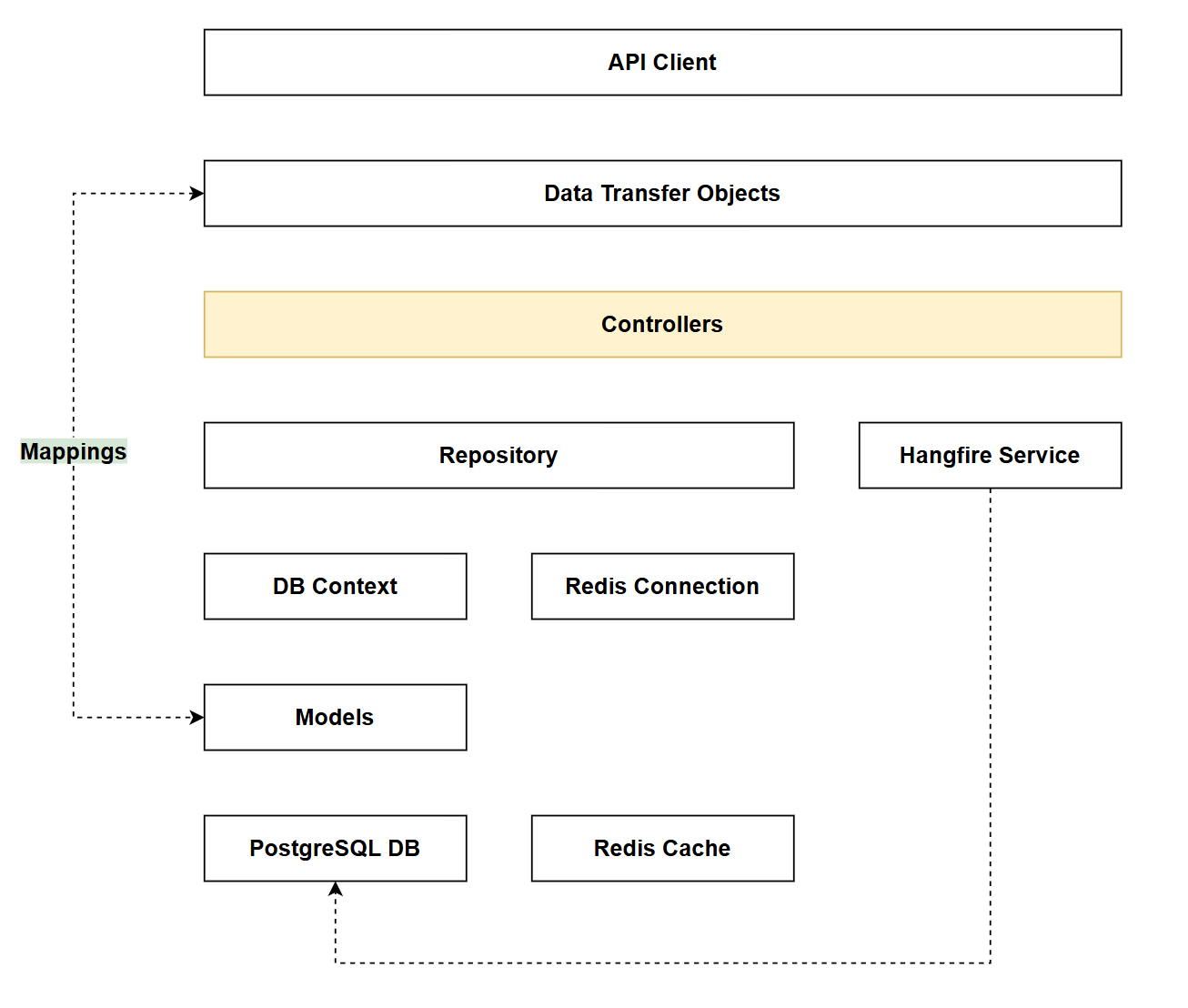
In reference to our solution architecture, we'll be making code changes to the highlighted components in this chapter:
- Controllers (partially complete)
- Mappings (complete)
- The code for this section can be found here on GitHub
- The complete finished code can be found here on GitHub
Feature branch
Ensure that main is current, then create a feature branch called: chapter_10_object_mapping, and check it out:
git branch chapter_10_object_mapping
git checkout chapter_10_object_mapping
If you can't remember the full workflow, refer back to Chapter 5
What is object mapping?
If we take a look at the code we have for UpdateCommand in the CommandsController we can see that we have manual mappings (highlighted):
[HttpPut("{id}")]
public async Task<ActionResult> UpdateCommand(int id, CommandUpdateDto commandUpdateDto)
{
    var commandFromRepo = await _commandRepo.GetCommandByIdAsync(id);
    if (commandFromRepo == null)
    {
        return NotFound();
    }

    // Manual mapping from DTO to entity
    commandFromRepo.HowTo = commandUpdateDto.HowTo;
    commandFromRepo.CommandLine = commandUpdateDto.CommandLine;

    await _commandRepo.UpdateCommandAsync(commandFromRepo);
    await _commandRepo.SaveChangesAsync();

    return NoContent();
}
At the moment we only have 2 properties that we need to update, but imagine if there were more. This approach to mapping would quickly become tiresome and error prone. That's where automated object mapping comes in.
Object mapping allows you to set up configurations that specify how properties should be mapped between objects, in our case this applies equally to:
- DTO -> Model (the above example)
- Model -> DTO
In instances where property names are identical between objects (as is the case for us) then these mapping profiles are very basic, (or indeed are not required at all) as the mapping framework automatically infers the mappings based on matching property names. Of course if this is not the case, or you need to add further mapping logic, then this can all be defined in the mapping config.
Object mapping short-comings
Introducing an object mapping framework to your project isn't all upsides. Indeed there is a strong body of opinion that object mapping is not the way to go and that manual mapping in code is not only sufficient, but preferable.
Some benefits of manual mapping are:
- Compile time errors: If there are issues in the way that you are manually mapping object properties (e.g. you don't map a
requiredproperty), you will get a compile time error. This is usually seen as infinitely preferable to run time errors that are more likely when using a mapping framework. - Code readability: It's fairly obvious what's happening with manual mapping, with object mapping, less so.
- Reduced cognitive load: Related to the last point, manual mapping is for all intents and purposes simple. You have to learn whatever mapping framework has been chosen for the project; with manual mapping, the approach is self-evident.
- Performance: Given manual mapping's simplicity, it's performant. Introducing mapping frameworks means additional processing may be required (e.g. Reflection).
As with many subjects in this book, I've included object mapping not necessarily because it is the prescribed way to build an API, but rather to arm the reader with enough information on whether they want to adopt the approach.
Mapping libraries
There are a few different mapping libraries in the .NET space, by far the most popular is AutoMapper, however I've decided not to use that in the book due to the changes in licensing conditions, instead opting for the equally good Mapster.
Conceptually both these libraries do the same thing, so do your own research and select the library that works best for your own projects.
Package installs
To use Mapster we need to install 2 packages as follows:
dotnet add package Mapster
dotnet add package Mapster.DependencyInjection
Check the .csproj file to ensure the packages were added correctly.
Mappings
In this section we'll create the mapping configuration we'll use application-wide, to do so:
- In the root of the project create a folder called Mappings.
- Create a file called MappingConfig.cs and place it into the Mappings folder
Add the following code to the MappingConfig.cs file:
using Mapster;
using CommandAPI.Models;
using CommandAPI.Dtos;

namespace CommandAPI.Mappings;

public class MappingConfig : IRegister
{
    public void Register(TypeAdapterConfig config)
    {
        // Platform mappings
        config.NewConfig<Platform, PlatformReadDto>();
        config.NewConfig<PlatformCreateDto, Platform>();
        config.NewConfig<PlatformUpdateDto, Platform>();

        // Command mappings
        config.NewConfig<Command, CommandReadDto>();
        config.NewConfig<CommandCreateDto, Command>();
        config.NewConfig<CommandUpdateDto, Command>();
    }
}
This code:
- Implements the
IRegisterinterface from Mapster, allowing this configuration to be automatically discovered and registered - Defines the
Registermethod where all mapping configurations are centralized - Creates bidirectional mapping configurations for our domain models and DTOs:
- Model → ReadDto: For converting entities to DTOs when returning data (e.g.,
PlatformtoPlatformReadDto) - CreateDto → Model: For converting incoming data to entities when creating resources
- UpdateDto → Model: For converting incoming data to entities when updating resources
- Model → ReadDto: For converting entities to DTOs when returning data (e.g.,
- Relies on convention-based mapping - since property names match between our models and DTOs, Mapster automatically infers how to map them without additional configuration
Register
We need to register the Mapster framework in our DI container, as usual this is done in Program.cs, so add the following highlighted lines:
using CommandAPI.Data;
using Mapster;
using Microsoft.EntityFrameworkCore;
using Npgsql;

//
// Existing code
//

builder.Services.AddScoped<IPlatformRepository, PgSqlPlatformRepository>();
builder.Services.AddScoped<ICommandRepository, PgSqlCommandRepository>();

builder.Services.AddMapster();

builder.Services.AddControllers();

//
// Existing code
//
Update controllers
With the mapping set up, we need to make use of them in the controllers, removing the manual mappings.
We'll go through each of the endpoints in both of our controllers, but first a couple of generic points to note:
- Make sure you add a
using Mapster;reference to both the Platforms and Commands controllers. - Unlike other services we've used, Mapster does not need to be injected into our controllers via dependency injection. Instead, it provides static extension methods (like
.Adapt<T>()) that can be called directly on any object. This means you won't see Mapster in constructor parameters, you simply call the mapping methods when needed. - When it comes to detailing the Mapster code for each endpoint, I'm only going to show:
- The existing manual mapping code (commented out)
- The replacement Mapster code
Remember you can find the completed code for this chapter here on GitHub.
Platforms controller
GetPlatforms
// Manual mapping to DTOs
//var platformDtos = platforms.Select(p => new PlatformReadDto(p.Id, p.PlatformName, p.CreatedAt));

//Using Mapster
var platformDtos = platforms.Select(p => p.Adapt<PlatformReadDto>());
This code:
- Calls the
.Adapt<PlatformReadDto>()extension method on eachPlatformobject - Automatically maps all matching properties from
PlatformtoPlatformReadDtousing the configuration we defined earlier - Eliminates the need to manually specify each property (compare with the commented code above)
- Returns the same result as the manual mapping, but with significantly less code
GetPlatformById
// Manual mapping to DTO
//var platformDto = new PlatformReadDto(platform.Id, platform.PlatformName, platform.CreatedAt);

//Using Mapster
var platformDto = platform.Adapt<PlatformReadDto>();
This code:
- Maps a single
Platformentity to aPlatformReadDto
GetCommandsForPlatform
// Manual mapping to DTO
//var commandDtos = commands.Select(c => new CommandReadDto(c.Id, c.HowTo, c.CommandLine, c.PlatformId, c.CreatedAt));

// Using Mapster
var commandDtos = commands.Select(c => c.Adapt<CommandReadDto>());
This code:
- Maps a collection of
Commandentities toCommandReadDtoobjects
CreatePlatform
// Manual mapping from DTO to entity
//var platform = new Platform
//{
//    PlatformName = platformCreateDto.PlatformName
//};

// Using Mapster
var platform = platformCreateDto.Adapt<Platform>();

await _platformRepo.CreatePlatformAsync(platform);
await _platformRepo.SaveChangesAsync();

// Manual mapping to DTO for response
//var platformReadDto = new PlatformReadDto(platform.Id, platform.PlatformName, platform.CreatedAt);

// Using Mapster
var platformReadDto = platform.Adapt<PlatformReadDto>();
This code:
- Maps a
PlatformCreateDtoto a newPlatformentity (for creation) - Maps the created
Platformentity to aPlatformReadDto(for the response)
UpdatePlatform
// Manual mapping from DTO to entity
//platformFromRepo.PlatformName = platformUpdateDto.PlatformName;

// Using Mapster
platformUpdateDto.Adapt(platformFromRepo);
This code:
- Maps properties from
PlatformUpdateDtoonto the existingplatformFromRepoentity (in-place mapping)
DeletePlatform
As we are destroying a resource there is no need to use Mapster.
Commands controller
GetCommands
// Manual mapping to DTOs
//var commandDtos = commands.Select(c => new CommandReadDto(c.Id, c.HowTo, c.CommandLine, c.PlatformId, c.CreatedAt));

// Using Mapster
var commandDtos = commands.Select(c => c.Adapt<CommandReadDto>());
This code:
- Maps a collection of
Commandentities toCommandReadDtoobjects
GetCommandById
// Manual mapping to DTO
//var commandDto = new CommandReadDto(command.Id, command.HowTo, command.CommandLine, command.PlatformId, command.CreatedAt);

// Using Mapster
var commandDto = command.Adapt<CommandReadDto>();
This code:
- Maps a single
Commandentity to aCommandReadDto
CreateCommand
// Manual mapping from DTO to entity
/*var command = new Command
{
    HowTo = commandCreateDto.HowTo,
    CommandLine = commandCreateDto.CommandLine,
    PlatformId = commandCreateDto.PlatformId
};
*/

// Using Mapster
var command = commandCreateDto.Adapt<Command>();

await _commandRepo.CreateCommandAsync(command);
await _commandRepo.SaveChangesAsync();

// Manual mapping to DTO for response
// var commandReadDto = new CommandReadDto(command.Id, command.HowTo, command.CommandLine, command.PlatformId, command.CreatedAt);

// Using Mapster
var commandReadDto = command.Adapt<CommandReadDto>();
This code:
- Maps a
CommandCreateDtoto a newCommandentity (for creation) - Maps the created
Commandentity to aCommandReadDto(for the response)
UpdateCommand
// Manual mapping from DTO to entity
//commandFromRepo.HowTo = commandUpdateDto.HowTo;
//commandFromRepo.CommandLine = commandUpdateDto.CommandLine;

// Using Mapster
commandUpdateDto.Adapt(commandFromRepo);
This code:
- Maps properties from
CommandUpdateDtoonto the existingcommandFromRepoentity (in-place mapping)
DeleteCommand
As we are destroying a resource there is no need to use Mapster.
Explicit mapping
As stated above, as we are using convention-based mapping (the property names are identical in both the source and destination objects), we don't even need to have the MappingConfig class as the automatic mapping inferences performed by Mapster are enough on their own. You could therefore do the following and Mapster would still work:
- Delete the
MappingConfig.csfile - Retain all other changes relating to Mapster
So why bother having the MappingConfig class in the first place?
In our current example we don't need one, that is true, but it is entirely possible that as we expand the code we may need to perform some explicit (or custom) mapping operations.
As an example (don't do this - it's just an illustration):
- We add a
VendorNamestring property to thePlatformmodel - We add a
CompanyNamestring property to the platform DTos.
Convention-based mapping would not be enough to infer the mapping between these 2 properties, so we'd need to set this up in the MappingConfig class as follows:
config.NewConfig<Platform, PlatformReadDto>()
    .Map(dest => dest.CompanyName, src => src.VendorName);
config.NewConfig<PlatformCreateDto, Platform>()
    .Map(dest => dest.VendorName, src => src.CompanyName);
    config.NewConfig<PlatformUpdateDto, Platform>()
    .Map(dest => dest.VendorName, src => src.CompanyName);
This code:
- Explicitly maps the
VendorNameproperty from thePlatformmodel to theCompanyNameproperty inPlatformReadDtowhen reading data - Maps the
CompanyNameproperty fromPlatformCreateDtoto theVendorNameproperty in thePlatformmodel when creating new resources - Maps the
CompanyNameproperty fromPlatformUpdateDtoto theVendorNameproperty in thePlatformmodel when updating existing resources
Doesn't this bring us back to manual mapping? Not quite. While we do need to explicitly configure these property mappings in the MappingConfig class, this is fundamentally different from the old approach. The key distinction is that this configuration happens once in a centralized location, and throughout your controllers you still just call .Adapt<T>(). Compare this to the previous manual mapping method where every controller action had to manually assign each property. The mapping logic is defined in one place and reused everywhere, making it far more maintainable.
For now, we'll continue to use convention-based mapping only. Personally I'd suggest leaving the MappingConfig class in place.
Exercising changes
The changes we have made should make absolutely no difference to the external API contract - it is an internal change only. With this in mind run up the app and exercise the requests you have in both: platforms.http and commands.http.
There should be no change in behavior.
Version Control
With the code complete, it's time to commit our code. A summary of those steps can be found below, for a more detailed overview refer to Chapter 5
- Save all files
git add .git commit -m "add object mapping using Mapster"git push(will fail - copy suggestion)git push --set-upstream origin chapter_10_object_mapping- Move to GitHub and complete the PR process through to merging
- Back at a command prompt:
git checkout main git pull
Conclusion
In this chapter we eliminated manual property mapping throughout our controllers by introducing Mapster, an object mapping library. Mapster supports both convention-based mapping (when property names match) and explicit mapping (when they don't), giving us flexibility as our application evolves. While our current implementation uses convention-based mapping exclusively, meaning we could technically omit the MappingConfig class, we've chosen to keep it in place to provide a clear location for future explicit mappings as the application grows.
The benefits of this approach are clear: our controller code is now cleaner and more maintainable, we've reduced the risk of mapping errors, and we've established a pattern that will scale as our models grow more complex. The .Adapt<T>() extension method provides a simple API that requires no dependency injection and minimal setup.
That said, Mapster does introduce trade-offs: there's a learning curve for the library itself, mapping behavior can be less explicit than manual property assignments (impacting readability), and there's a small performance overhead from reflection-based mapping at runtime. For simple models, manual mapping may be preferable, but as complexity grows, auto-mapping benefits typically outweigh these concerns.
Finally, this was a purely internal refactoring: the API contract remains unchanged. This demonstrates a key principle of good API design: improving internal implementation without affecting consumers. As your application evolves, you'll find that having mapping logic centralized makes it much easier to handle future changes to your models or DTOs.