28. Unit Testing
About this chapter
In this chapter we look at Unit Testing. This involves building up a suite of small, focused tests that exercise the discrete, novel features of the API. It also means that we can run this test suite at any time (e.g. following the introduction of new features) to ensure the existing tests continue to pass.
Learning outcomes
- Understand what unit testing is and what should (and shouldn't) be tested
- Learn the key benefits of unit testing and Test Driven Development (TDD)
- Set up an xUnit test project in .NET with required dependencies
- Use Moq to create mock objects for isolating code under test
- Write effective unit tests following the Arrange-Act-Assert pattern
- Run, validate, and interpret unit test results
- Apply different approaches to building comprehensive test suites (manual, AI-assisted)
- Generate code coverage reports using coverlet and reportgenerator
- Interpret coverage metrics: line coverage, branch coverage, cyclomatic complexity, and CRAP score
- Use coverage reports to identify high-priority areas for testing
Architecture Checkpoint
The architecture of the API solution remains unchanged, but it is worth highlighting the relationship between the existing API project and the new Unit Test Project we'll build in this chapter:
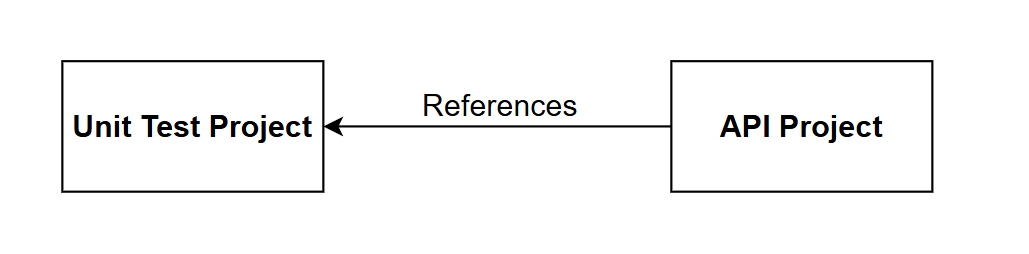
It should be noted:
- The API Project is completely unaware of the Unit Test Project
- No code changes required in the API project to support unit testing
- The Unit Test project references the API project in order that it can test it
We'll be starting a new project for unit testing that we'll complete in 1 sitting in this chapter.
- The complete finished code can be found here on GitHub
What is Unit Testing
Unit testing involves writing automated tests that verify individual components of your code in isolation. Each test focuses on a single "unit" - typically a method or function - checking that it behaves correctly for a given set of inputs.
What we test:
- Business logic in services
- Custom validation rules
- Data transformations and mappings
- Helper methods and utilities
- Controller action logic
What we don't test:
- Framework code (ASP.NET Core, Entity Framework)
- Database operations (use integration tests instead)
- Third-party libraries
- Simple properties or getters/setters with no logic
In short we test the novelty, or value unique to our code, we do not need to test functionality that has already (we hope!) been tested by the maintainers of the frameworks & libraries we use.
Why unit test?
Unit tests provide fast feedback during development, catching bugs before they reach production. They serve as living documentation of how code should behave and give confidence when refactoring. A comprehensive test suite acts as a safety net, allowing developers to modify code knowing that breaking changes will be caught immediately.
Key benefits:
- Cheap - the cost catching (and fixing) a bug at the point when your writing unit tests is magnitudes smaller than the cost of fixing bug that has made its way to production
- Fast execution - run hundreds of tests in seconds
- Isolation - tests run independently without external dependencies
- Debugging - pinpoint exactly where failures occur
- Regression prevention - ensure fixes stay fixed
- Design feedback - difficult-to-test code often indicates design issues
Test Driven Development
You may have heard of a software development approach called Test Driven Development (TDD) that's worth talking about briefly in this chapter.
With TDD, tests are written first (before the functional code), following the Red-Green-Refactor cycle:
- Red - Write a failing test for the feature you want to implement
- Green - Write the minimum code needed to make the test pass
- Refactor - Improve the code while keeping tests passing
The benefits of this approach include:
- Complete test coverage by default - testing isn't an afterthought
- Forces you to think about requirements and design up-front
- Provides immediate feedback on design decisions
While TDD works well for many teams and certain types of projects, it requires discipline and can feel slow initially. In practice, many developers adopt a pragmatic approach: writing tests alongside code rather than strictly adhering to the Red-Green-Refactor cycle.
Behavior Driven Development (BDD)
A related approach is defining acceptance criteria for user stories using Given / When / Then syntax:
Given: I have a bank_balance of $100.00
When: I deposit $10.00
Then: bank_balance = $110.00
This structure bridges the gap between business requirements and automated tests, making expectations clear to both developers and stakeholders. I have seen this work well, indeed I have written many hundreds of acceptance criteria using this approach.
Unit Testing in .NET
.NET has three primary unit testing frameworks, all fully supported and capable:
xUnit (we'll use this)
- Modern, open-source framework
- Clean, attribute-based syntax
- Strong isolation - creates new test class instance per test
- Most popular choice for new .NET projects
NUnit
- Mature, battle-tested framework
- Rich assertion library
- Widely used in enterprise environments
- Good for complex test scenarios
MSTest
- Microsoft's built-in testing framework
- Integrated with Visual Studio
- Good for teams heavily invested in Microsoft tooling
Alongside xUnit, we'll use:
- Moq - Mocking framework for creating test doubles (fake implementations of dependencies)
Arrange / Act / Assert
All testing frameworks follow some form of the Arrange-Act-Assert pattern:
- Arrange - Set up test data and dependencies
- Act - Execute the code under test
- Assert - Verify the results match expectations
Project set up
We're going to create a sibling project for our unit tests. At a command prompt ensure you are in your main working directory: i.e. running ls, you should see the project directory for the API:
$ ls
CommandAPI
Scaffold the project
Continuing at the command prompt, execute the following to scaffold up an xUnit project:
dotnet new xunit -n CommandAPI.UnitTests
This should create the unit test project for us, change into this directory and open in code:
cd CommandAPI.UnitTests
code .
Once opened in VS Code, delete the UnitTest1.cs file, as we'll be creating our own later.
Version Control
Next we'll generate a .gitignore file:
dotnet new gitignore
Initialize a new Git repository and place under version control:
git init
git add .
git commit -m "Initial Version"
My branch defaults to master so I'll change that to main as follows:
git branch -M main
Create an associated repository on GitHub and push the project. If you can't remember how to do that, refer to the steps outlined here.
References
The first reference we'll want to add to the unit test project is a reference to the API project. To do so, open the .csproj file for the unit test project and add a new <ItemGroup> as highlighted below:
<Project Sdk="Microsoft.NET.Sdk">

  <PropertyGroup>
    <TargetFramework>net10.0</TargetFramework>
    <ImplicitUsings>enable</ImplicitUsings>
    <Nullable>enable</Nullable>
    <IsPackable>false</IsPackable>
  </PropertyGroup>

  <ItemGroup>
    <PackageReference Include="coverlet.collector" Version="6.0.4" />
    <PackageReference Include="Microsoft.NET.Test.Sdk" Version="17.14.1" />
    <PackageReference Include="xunit" Version="2.9.3" />
    <PackageReference Include="xunit.runner.visualstudio" Version="3.1.4" />
  </ItemGroup>

  <ItemGroup>
    <Using Include="Xunit" />
  </ItemGroup>

  <ItemGroup>
    <ProjectReference Include="..\CommandAPI\CommandAPI.csproj" />
  </ItemGroup>

</Project>
Note: You will need to change the path if you've placed the projects in a different folder structure to the one I've described.
With our project reference set, all we need to do now is add the package references we require, first up: Moq:
dotnet add package Moq
Moq is a mocking library that creates fake implementations of interfaces and abstract classes for testing. When testing a class with dependencies (like a service that depends on a repository), you need to isolate the code under test from those dependencies.
Mock objects simulate the behavior of real dependencies without executing the actual code. For example:
- Mock a repository interface to return test data without hitting a database
- Mock an HTTP client to simulate API responses without making network calls
- Mock a logger to verify logging calls without writing to disk
Moq lets you:
- Define what methods should return (
Setup()) - Verify methods were called with expected parameters (
Verify()) - Configure complex behaviors without writing full fake classes
This keeps tests fast, isolated, and focused on the specific logic being tested.
Finally add the following 2 packages to support EF Core:
dotnet add package Microsoft.EntityFrameworkCore.InMemory
dotnet add package Microsoft.EntityFrameworkCore.Relational
The InMemory package provides an in-memory database provider that we can use for testing without requiring a real database connection. The Relational package provides core abstractions and shared functionality for relational databases, which the InMemory provider depends on for certain operations.
Writing tests
One of the benefits of TDD (discussed above) was:
Complete test coverage by default - testing isn't an afterthought
Wouldn't that be a lovely situation to be in now? We'd not only have our fully working API, but we'd also have a full unit test suite that we'd built up along the way.
Unfortunately we're not in that position, so we now have to write a bunch of tests... urgh.
Let's just get started with our first test so we have some practical hands on with xUnit, we can then start to talk about approaches to developing a full test suite.
First test
The first test we'll write will test that the GetPlatformsAsync method in the PlatformsController:
- Returns a successful result
- Returns a paginated list of
PlatformReadDtos - Returns the expected data content
In the unit test project create a folder called Controllers, then in that folder create a file called: PlatformsControllerTests.cs and add the following code:
using CommandAPI.Controllers;
using CommandAPI.Data;
using CommandAPI.Dtos;
using CommandAPI.Models;
using Microsoft.AspNetCore.Mvc;
using Microsoft.Extensions.Logging;
using Moq;

namespace CommandAPI.UnitTests.Controllers;

public class PlatformControllerTests
{
    private readonly Mock<IPlatformRepository> _mockPlatformRepo;
    private readonly PlatformsController _controller;

    public PlatformControllerTests()
    {
        _mockPlatformRepo = new Mock<IPlatformRepository>();
        _controller = new PlatformsController(
            _mockPlatformRepo.Object,
            new Mock<ICommandRepository>().Object,
            new Mock<IBulkImportJobRepository>().Object,
            new Mock<ILogger<PlatformsController>>().Object
        );
    }

    [Fact]
    public async Task GetPlatforms_ReturnsOkWithMappedDtos()
    {
        // Arrange
        var platforms = new List<Platform>
        {
            new Platform { Id = 1, PlatformName = "Linux", CreatedAt = DateTime.UtcNow },
            new Platform { Id = 2, PlatformName = "Windows", CreatedAt = DateTime.UtcNow }
        };
        var paginatedPlatforms = new PaginatedList<Platform>(platforms, 2, 1, 10);

        _mockPlatformRepo
            .Setup(r => r.GetPlatformsAsync(1, 10, null, null, false))
            .ReturnsAsync(paginatedPlatforms);

        // Act
        var result = await _controller.GetPlatforms(new PaginationParams());

        // Assert
        var okResult = Assert.IsType<OkObjectResult>(result.Result);
        var returnedList = Assert.IsType<PaginatedList<PlatformReadDto>>(okResult.Value);
        Assert.Equal(2, returnedList.Items.Count);
        Assert.Equal("Linux", returnedList.Items[0].PlatformName);
        Assert.Equal("Windows", returnedList.Items[1].PlatformName);
    }
}
There is a lot going on here so let's break it down
Private readonly fields
private readonly Mock<IPlatformRepository> _mockPlatformRepo;
private readonly PlatformsController _controller;
We create:
- A mocked version of the
IPlatformRepository- this creates a fake implementation of the repository interface that we can control in our tests. This allows us to specify what data methods should return and verify which methods get called, all without needing a real database or repository implementation. - An instance of
PlatformsController- this is what we are testing so we don't want to mock it we want to use an actual instance of it.
Mock the dependencies, not the thing you're testing.
In our example:
- Mock:
IPlatformRepository,ICommandRepository,IBulkImportJobRepository,ILogger- these are dependencies injected into the controller - Don't mock:
PlatformsController- this is the System Under Test (SUT)
General rules:
- Do mock: Interfaces for repositories, services, external APIs, loggers, file systems, databases
- Don't mock: The class being tested, simple data objects (DTOs, models), value objects
Mocking dependencies lets you control their behavior and focus the test on the logic within the controller method itself.
Constructor
public PlatformControllerTests()
{
    _mockPlatformRepo = new Mock<IPlatformRepository>();
    _controller = new PlatformsController(
        _mockPlatformRepo.Object,
        new Mock<ICommandRepository>().Object,
        new Mock<IBulkImportJobRepository>().Object,
        new Mock<ILogger<PlatformsController>>().Object
    );
}
This code:
- Runs before each test: xUnit creates a fresh instance of the test class for every test method, ensuring complete isolation between tests
- Creates the platform repository mock:
new Mock<IPlatformRepository>()creates a fake repository we can configure with specific behaviors (stored in a field so we can reference it in our tests) - Instantiates the controller: creates a real
PlatformsControllerinstance (not mocked - this is our System Under Test) - Injects mock dependencies: the controller constructor receives mocked versions of all its dependencies (repositories and logger)
- Uses
.Objectproperty: extracts the actual mock object that implements the interface from theMock<T>wrapper - Inline mocks for unused dependencies:
ICommandRepository,IBulkImportJobRepository, andILoggerare created inline since we won't need to configure their behavior for this particular test
This setup follows the principle discussed earlier: mock the dependencies, test the real thing.
The unit test
[Fact]
public async Task GetPlatforms_ReturnsOkWithMappedDtos()
{
    // Arrange
    var platforms = new List<Platform>
    {
        new Platform { Id = 1, PlatformName = "Linux", CreatedAt = DateTime.UtcNow },
        new Platform { Id = 2, PlatformName = "Windows", CreatedAt = DateTime.UtcNow }
    };
    var paginatedPlatforms = new PaginatedList<Platform>(platforms, 2, 1, 10);

    _mockPlatformRepo
        .Setup(r => r.GetPlatformsAsync(1, 10, null, null, false))
        .ReturnsAsync(paginatedPlatforms);

    // Act
    var result = await _controller.GetPlatforms(new PaginationParams());

    // Assert
    var okResult = Assert.IsType<OkObjectResult>(result.Result);
    var returnedList = Assert.IsType<PaginatedList<PlatformReadDto>>(okResult.Value);
    Assert.Equal(2, returnedList.Items.Count);
    Assert.Equal("Linux", returnedList.Items[0].PlatformName);
    Assert.Equal("Windows", returnedList.Items[1].PlatformName);
}
This method: GetPlatforms_ReturnsOkWithMappedDto is the unit test, you can infer this because it is decorated with the [Fact] attribute. The contents of the method follow the: Arrange -> Act -> Assert pattern mentioned in the intro, specifically:
Arrange:
- Creates test
Platformobjects (domain models) with sample data - Wraps them in a
PaginatedList<Platform>with pagination metadata (2 total items, page 1, page size 10) - Configures the mock repository using
.Setup()to return this test data whenGetPlatformsAsyncis called with specific parameters .ReturnsAsync()tells Moq what data to return - this is the mock behavior configuration we discussed earlier
Act:
- Calls the controller method under test:
GetPlatforms() - Passes default
PaginationParams(which defaults to page 1, size 10) - Stores the result for verification
Assert:
Assert.IsType<OkObjectResult>()- verifies the HTTP result type is 200 OKAssert.IsType<PaginatedList<PlatformReadDto>>()- confirms the response contains a paginated list of DTOs (not domain models)Assert.Equal(2, ...)- verifies the correct number of items returnedAssert.Equal("Linux", ...)andAssert.Equal("Windows", ...)- validates the actual data content and mapping fromPlatformtoPlatformReadDto
This test verifies that the controller correctly calls the repository, receives domain models, maps them to DTOs, and returns the appropriate HTTP result.
The test method above is called: GetPlatforms_ReturnsOkWithMappedDtos
This follows a common naming pattern: MethodName_ExpectedBehavior
Breaking it down:
GetPlatforms- the method being testedReturnsOkWithMappedDtos- what we expect to happen- Both components are separated by an underscore
This naming convention makes test results immediately readable. When a test fails, you can quickly identify what method failed and what behavior wasn't working.
Other common patterns:
MethodName_Scenario_ExpectedResult- e.g.,GetPlatforms_WhenNoPlatformsExist_ReturnsEmptyListMethodName_StateUnderTest_ExpectedBehavior- e.g.,Withdraw_InsufficientFunds_ThrowsException
Choose a convention and be consistent across your test suite. The goal is clarity and maintainability.
Run the test
We should have everything in place to run our test, just make sure you save everything, and have a green build, after that it's simply:
dotnet test
This test should pass:
Restore complete (0.4s)
  CommandAPI net10.0 succeeded (0.3s) → /home/CommandAPI/bin/Debug/net10.0/CommandAPI.dll
  CommandAPI.UnitTests net10.0 succeeded (0.1s) → bin/Debug/net10.0/CommandAPI.UnitTests.dll
[xUnit.net 00:00:00.00] xUnit.net VSTest Adapter v3.1.4+50e68bbb8b (64-bit .NET 10.0.0)
[xUnit.net 00:00:00.05]   Discovering: CommandAPI.UnitTests
[xUnit.net 00:00:00.08]   Discovered:  CommandAPI.UnitTests
[xUnit.net 00:00:00.09]   Starting:    CommandAPI.UnitTests
[xUnit.net 00:00:00.20]   Finished:    CommandAPI.UnitTests
  CommandAPI.UnitTests test net10.0 succeeded (0.7s)

Test summary: total: 1, failed: 0, succeeded: 1, skipped: 0, duration: 0.7s
Build succeeded in 1.8s
Make it fail
As important, actually perhaps more important than our test succeeding when conditions are met, is that the test should fail when the conditions are not met. If the test is successful no matter what, not only is that a useless false positive, but it could be decidedly dangerous!
To that end, let's force a fail on one of the conditions by changing the following line in the Arrange section:
new Platform { Id = 1, PlatformName = "Linux", CreatedAt = DateTime.UtcNow },
To this:
new Platform { Id = 1, PlatformName = "Unix", CreatedAt = DateTime.UtcNow },
This means when the following assertion is run:
Assert.Equal("Linux", returnedList.Items[0].PlatformName);
We'll get a failure.
Make the change, save your work, and retest. You should see something like this:
[xUnit.net 00:00:00.00] xUnit.net VSTest Adapter v3.1.4+50e68bbb8b (64-bit .NET 10.0.0)
[xUnit.net 00:00:00.04]   Discovering: CommandAPI.UnitTests
[xUnit.net 00:00:00.07]   Discovered:  CommandAPI.UnitTests
[xUnit.net 00:00:00.08]   Starting:    CommandAPI.UnitTests
[xUnit.net 00:00:00.18]     CommandAPI.UnitTests.Controllers.PlatformControllerTests.GetPlatforms_ReturnsOkWithMappedDtos [FAIL]
[xUnit.net 00:00:00.19]       Assert.Equal() Failure: Strings differ
[xUnit.net 00:00:00.19]                  ↓ (pos 0)
[xUnit.net 00:00:00.19]       Expected: "Linux"
[xUnit.net 00:00:00.19]       Actual:   "Unix"
[xUnit.net 00:00:00.19]                  ↑ (pos 0)
[xUnit.net 00:00:00.19]       Stack Trace:
[xUnit.net 00:00:00.19]         /home/CommandAPI.UnitTests/Controllers/PlatformControllerTests.cs(49,0): at CommandAPI.UnitTests.Controllers.PlatformControllerTests.GetPlatforms_ReturnsOkWithMappedDtos()
[xUnit.net 00:00:00.19]         --- End of stack trace from previous location ---
[xUnit.net 00:00:00.19]   Finished:    CommandAPI.UnitTests
  CommandAPI.UnitTests test net10.0 failed with 1 error(s) (0.7s)
    /home/ljackson/dev/dotnet/Run2/CommandAPI.UnitTests/Controllers/PlatformControllerTests.cs(49): error TESTERROR:
      CommandAPI.UnitTests.Controllers.PlatformControllerTests.GetPlatforms_ReturnsOkWithMappedDtos (78ms): Error Message: Assert.Equal() Failur
      e: Strings differ
                 ↓ (pos 0)
      Expected: "Linux"
      Actual:   "Unix"
                 ↑ (pos 0)
      Stack Trace:
         at CommandAPI.UnitTests.Controllers.PlatformControllerTests.GetPlatforms_ReturnsOkWithMappedDtos() in /home/ljackson/dev/dotnet/Run2/Co
      mmandAPI.UnitTests/Controllers/PlatformControllerTests.cs:line 49
      --- End of stack trace from previous location ---

Test summary: total: 1, failed: 1, succeeded: 0, skipped: 0, duration: 0.7s
Build failed with 1 error(s) in 4.0s
You can see the output is pretty verbose, describing the reason why the test failed.
Change test back to the way it was originally so that it passes.
Extending test coverage
At this point we're faced with the daunting task of creating enough unit tests so that we have decent coverage of our functionality. What approaches could we take to doing this?
- Old Skool: Manually create the tests by breaking the API project into logical functional areas, e.g. Controllers, Repositories etc. then for each class in each category manually construct test cases.
- Vibe code it: Throw the entire testing project at an AI agent and hope for the best.
- AI Assisted. Work in tandem with an AI agent (i.e. you drive it) to find the best iterative approach to building out tests for each logical decomposed area.
Code coverage measures what percentage of your code is executed when tests run. It shows which lines, branches, and methods are tested versus untested.
In .NET, the coverlet package (included in xUnit projects by default) collects coverage data. Generate an HTML report with:
dotnet test --collect:"XPlat Code Coverage" --results-directory ./coverage
dotnet tool install -g dotnet-reportgenerator-globaltool
reportgenerator -reports:"./coverage/**/coverage.cobertura.xml" -targetdir:"./coverage/report" -reporttypes:Html
Open coverage/report/index.html to see a visual breakdown showing which files and lines lack test coverage.
Important perspective: High coverage (80%+) suggests thorough testing, but 100% coverage doesn't mean bug-free code. You can execute every line without testing meaningful scenarios. Conversely, low coverage clearly indicates untested areas that deserve attention. Use coverage to find gaps, not as a quality score.
Old Skool
There isn't really any magic here, it's really just brute-force work. Quite laborious, tedious work if I'm being honest. I've found there can be an order of magnitude in difference between the effort taken to write a feature vs. the effort to write unit tests for that feature.
A simple feature could take an hour or so to write, the tests for the that feature can take many hours...
What tests do you write?
Writing unit tests is one of those things that definitely improves with practice. It's really about striking a balance of testing enough to provide confidence that the tests will catch issues should they arise. Some simple tips:
-
Start with the happy path - Test the expected, successful execution flow first. If a method is supposed to return data when given valid inputs, verify that's working before testing edge cases.
-
Test boundary conditions - Think about the edges: empty lists, null values, maximum/minimum values, first and last items, zero, negative numbers. These are where bugs often hide.
-
Test error handling - If your code validates input or handles errors, test that invalid data produces the expected exceptions or error responses. Don't just test success scenarios.
-
Test business logic - Any calculations, transformations, or business rules are prime candidates for unit tests. If there's an algorithm or formula, test it thoroughly with various inputs.
-
Test state changes - If a method modifies state (updates a value, changes status, adds to a collection), verify those changes actually occur as expected.
-
One assertion per logical concept - While not a hard rule, having focused tests makes failures easier to diagnose. Instead of one giant test with 10 assertions, consider several smaller tests each validating one specific behavior.
-
Think about what could realistically break - Don't test that a property getter returns the value you just set (trivial). Do test that a complex filtering method returns the right subset of data (valuable).
-
Use code coverage as a guide, not a goal - 100% coverage doesn't guarantee quality tests. Focus on testing meaningful behaviors rather than chasing a coverage percentage. That said, if you see areas with 0% coverage, that's worth investigating.
-
Ask "what would I verify manually?" - If you were testing this feature by hand, what would you check? Those manual testing steps often translate directly into unit test scenarios.
Vibe it
Vibe-coding can mean different things to different people, I'd define it as:
A process where the human asking the AI agent to generate code, never actually reviews that code.
This can be totally acceptable in some scenarios when you just want to create a throwaway piece of work that is not expected to live in production.
For example, I used this approach to write a small web-based multiple choice exam system that helped me prepare for an exam I was taking. I never once looked at the code, and I used the app once or twice as I prepared for the exam. It was never used again afterwards.
Beyond use-cases like that, I'd never vibe-code anything, including getting an AI agent to write all my unit tests. This goes back to the need I have to manually review the code that's generated.
AI Assisted
I think most developers that use AI tools probably take this approach where you work with an AI agent to generate code. With this approach:
- We take the time to define the project context and outcomes
- We break the work down into smaller units for the AI agent to tackle.
- We go through a planning phase with the AI - no code, just a plan for human review
- We implement iteratively - this includes human code review
Taking this approach with the AI Agent of your choice I feel can yield great results, and would be the one I'd recommend here.
Claude code example
To round out this chapter, I'll go through how we can take the unit test project we have so far, and use it with Claude Code to generate a wide range of tests.
There are of course alternatives to Claude Code, I've probably got more hours with GitHub Copilot if I'm honest, and it too is a great tool.
So while the example I'm going to go through is using Claude Code, the general approach is ubiquitous to whatever agent you are using.
Initialize project
Instructions on installing Claude Code can be found here. Once installed at a command prompt ensure you are in the unit test project then start Claude Code as follows:
claude
You may be asked if you want to trust the folder, if you want to continue then select Yes.
At the Claude Code CLI, initialize the project:
/init this is an xUnit project set up to test the CommandAPI project which is adjacent to this project. We have 1 unit test set up for a controller, but will want to extend test case coverage.
The
/initcommand is all thats strictly necessary for Claude to go off an analyze the project, but you can provide further context after this command as I've done here.
Wait while Claude analyzes the project, however you may be asked to approve various commands it wants to run. Please read what it wants to do carefully, and approve (or reject) as required.
Once complete you should have a CLAUDE.md artifact that Claude will use going forward as baseline context. It may also update this file as you evolve what the unit test project is doing.
Create a plan
Claude Code has the ability to plan an implementation - this is highly desirable as you tend to get better quality results using this approach, as opposed to jumping straight into implementation. I used the following prompt at the Claude Code CLI to get it to plan the full implementation, but emphasize that we'll be implementing iteratively.
Produce a plan for the implementation of a range of unit tests covering all relevant functional areas, e.g. Controllers, Repositories etc. We'll be implementing tests iteratively, e.g. we'll start implementing tests for the PlatformsController first. We should aim for 80% code coverage or above.
Claude will jump into planning mode, and may ask for approval for the steps it needs to undertake to analyze both the unit test and API projects.
Once Claude has finished you should end up with an implementation plan. Of course Claude is non-deterministic, so if you're following along the plan that you will get will be different to the one generated for me.
In my case Claude has broken the plan in to Phases:
- Phase 1: PlatformsController
- Phase 2: CommandsController
- Phase 3: RegistrationsController
- Phase 4: Validators
- Phase 5: Repositories
- Phase 6: BulkPlatformImportService
- Phase 7: GlobalExceptionHandlerMiddleware
It has then provided estimates of an accumulated code coverage impacts:
| Phase | Target Components | Estimated Cumulative Coverage |
|---|---|---|
| 1 | PlatformsController | ~25% |
| 2 | CommandsController | ~40% |
| 3 | RegistrationsController | ~45% |
| 4 | Validators | ~55% |
| 5 | Repositories | ~70 |
| 6 | BulkPlatformImportService | ~78% |
| 7 | GlobalExceptionHandlerMiddleware | ~83% |
And has provided a list of the test cases it wants to create for each component, I'm not going to list all of those, but I have provided the cases it generated for the PlatformsController:
| Test Number | Test Name | Behavior |
|---|---|---|
| 0 | GetPlatforms_ReturnsOkWithMappedDtos | Happy path, 2 items mapped |
| 1 | GetPlatforms_WithSearch_PassesSearchToRepo | Verifies search param forwarded |
| 2 | GetPlatforms_WithSortAndDescending_PassesParamsToRepo | Verifies sort params forwarded |
| 3 | GetPlatforms_EmptyResult_ReturnsOkWithEmptyList | Repo returns 0 items |
| 4 | GetPlatformById_Found_ReturnsOkWithDto | Happy path |
| 5 | GetPlatformById_NotFound_Returns404 | Repo returns null |
| 6 | GetCommandsForPlatform_PlatformFound_ReturnsOkWithCommands | Happy path |
| 7 | GetCommandsForPlatform_PlatformNotFound_Returns404 | Platform repo returns null |
| 8 | CreatePlatform_ValidDto_Returns201WithLocation | CreatedAtRoute + DTO mapping |
| 9 | UpdatePlatform_Found_Returns204 | Happy path |
| 10 | UpdatePlatform_NotFound_Returns404 | Repo returns null |
| 11 | DeletePlatform_Found_Returns204 | Happy path |
| 12 | DeletePlatform_NotFound_Returns404 | Repo returns null |
| 13 | BulkImportPlatforms_ValidRequest_Returns202WithJobDetails | Job created + Hangfire enqueued |
| 14 | GetBulkImportStatus_OwnJob_ReturnsOkWithStatus | User matches job owner |
| 15 | GetBulkImportStatus_JobNotFound_Returns404 | Job repo returns null |
| 16 | GetBulkImportStatus_DifferentUser_ReturnsForbid | User doesn't own job |
Evaluate the plan
Just because a plan has been created for us, does not mean that we have to automatically accept everything about it. You need to review it and ensure it is fit for what you want to achieve. From my perspective the there were a few small things about this plan that didn't hit the mark 100%:
- How Claude interpreted the requirement on test coverage. It was a totally reasonable approach, but I was wanting each individual functional component to be assessed separately - not the entire code base as a whole.
- The tests for all repositories have been grouped into 1 phase (Phase 5) I'd probably like to get this broken down further
The suggested tests all seem reasonable - we can always add to them if we find any gaps.
Work with Claude to rework your plan as required and when you're happy: Ask Claude to save the plan. I've found that if you do not do this, then the plan is not always available in future sessions - which can be a pain.
Incrementally implement
I personally would not ask Claude to implement this whole plan, indeed I'd ask it only implement the first 2 or 3 use-cases from one of the functional areas (e.g. PlatformsController) just to see how it does, and to:
- Validate the code
- Run the tests
Before implementing anything with Claude, I always ensure any existing changes are safely committed and the branch is clean. Indeed we're really treating Claude as another developer here, so usually always create a feature branch for the changes it's going to make, (or ask Claude to do this!).
In this way we can cleanly segregate the changes being made by Claude, and discard cleanly if necessary.
This approach enforces the many benefits of using Feature Branches as discussed in the theory section.
To implement the first 3 test cases for PlatformsController, my prompt would be:
Implement the first 3 tests for the PlatformController
As usual Claude may ask for permission for certain activities, you'll need to decide if you're happy with it to proceed.
In my case Claude:
- Wrote the 3 new test cases
- Ran the test
- All tests passed
Manual validation
At this point I'd also:
- Read the test code to ensure I understand (and agree) with what it is doing
- Run the tests myself
You can now begin to repeat the iterative implementation steps as you see fit.
Assessing coverage
In the Extending Coverage section we talked about Code Coverage and how to generate a report with coverlet. Let's follow those steps to see what we get.
Note: I'm generating this report after implementing only 4 tests in the
PlatformsControllerso the coverage score is going to be low.
Generate coverage metrics
dotnet test --collect:"XPlat Code Coverage" --results-directory ./coverage
This command:
- Runs all unit tests in the project
- Collects cross-platform code coverage data using coverlet (included by default in xUnit projects)
- Saves coverage results to the
./coveragedirectory - Generates a
coverage.cobertura.xmlfile containing line-by-line coverage metrics
The output shows which tests passed/failed and creates coverage data files that can be used to generate visual reports.
Install report generator
dotnet tool install -g dotnet-reportgenerator-globaltool
This command:
- Installs the
dotnet-reportgeneratortoolset used in the last step.
Generate visual report
reportgenerator -reports:"./coverage/**/coverage.cobertura.xml" -targetdir:"./coverage/report" -reporttypes:Html
This command:
- Uses
dotnet-reportgeneratorto generate a visual report from the raw coverage metrics
You can see an example of this report below:
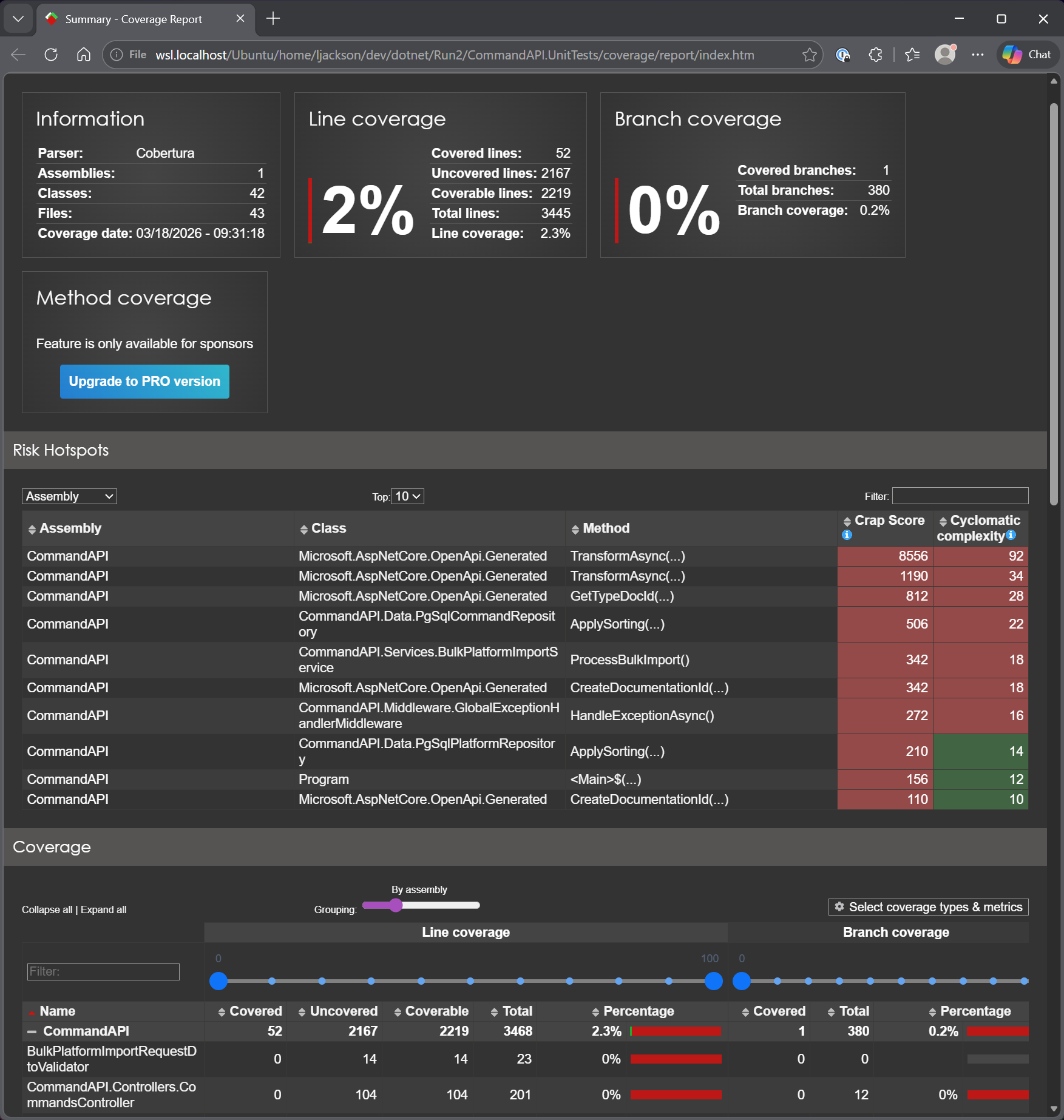
The following terms and concepts from the report are useful to understand:
Line Coverage
A line in this context means a statement, an executable unit of code. Line coverage answers: did a test cause this line to execute at all?
var result = repo.GetPlatforms();   // line 1: covered if any test reaches here
return Ok(result);                  // line 2:  only covered if line 1 ran
It's the most basic coverage metric. Its weakness: a line can execute without being tested properly: a test that calls a method but makes no assertions still counts as covered.
Branch Coverage
Branches are the decision points in code: every if, else, &&, ||, ??, ternary, switch case. Each creates two or more paths.
if (search != null)         // branch 1: search IS null
  query = query.Where(...)  // branch 2: search is NOT null
You need a test for each branch to cover both. A method can be 100% line covered but 50% branch covered if only one path through an if is ever tested.
Branch coverage is generally considered more meaningful than line coverage.
Cyclomatic Complexity
A count of the number of independent paths through a method. Each decision point adds 1:
- Base score: 1
- Each
if,else if,for,while,case,&&,||,??: +1
// Complexity = 1
public string Greet() => "hello";

// Complexity = 3 (base + if + else if)
public string Grade(int score) {
  if (score > 90) return "A";
  else if (score > 70) return "B";
  return "C";
}
High complexity = hard to understand, hard to test, more likely to contain bugs. You can see that the top 3 methods with the highest Cyclomatic Complexity and CRAP scores (see below) are from the Microsoft.AspNetCore.OpenAPI.Generated class. We would not aim to test these as we did not write them.
From this perspective, our highest priority to write a test for is the ApplySorting() method in the PgSqlCommandRepository.
CRAP Score
Stands for Change Risk Anti-Patterns. It combines cyclomatic complexity with coverage:
CRAP = complexity² × (1 - coverage)³ + complexity
The key insight: complex code with no tests is exceedingly risky. The score punishes you doubly for having complicated untested code.
- A simple method (complexity 1) with 0% coverage: CRAP = 2 - not great, but low risk
- A complex method (complexity 92) with 0% coverage: CRAP = 8556 - very high risk
- A complex method (complexity 22) with 100% coverage: CRAP = 22 - same as its complexity
The goal is to get CRAP scores down either by adding tests or simplifying the code.
These reports are incredibly useful in helping us:
- Understand test coverage
- Identifying priorities for testing (e.g. prioritize complex methods over the trivial).
Version Control
With the code complete, it's time to commit and push our code. I've only been working with local branches in this chapter and merging them locally to main when happy. To that end we just need to commit and push to main.
- Save all files
git add .git commit -m "Add unit tests"git push
Conclusion
Unit testing provides fast, reliable feedback on code behavior and serves as a safety net during refactoring and feature development. In this chapter we established a solid foundation by:
- Setting up an xUnit test project with Moq for dependency mocking
- Writing tests following the Arrange-Act-Assert pattern
- Exploring different approaches to building test suites, from manual test writing to AI-assisted development
- Generating and interpreting code coverage reports to identify testing priorities
The coverage metrics, particularly branch coverage and CRAP scores, help focus testing efforts where they matter most: complex, business-critical code that's prone to bugs.
While achieving high test coverage takes effort, the investment pays dividends. Tests catch regressions early, document expected behavior, and give confidence when making changes. As you continue building APIs, consider adopting unit testing from the start, it's far easier to write tests alongside features than to retrofit them later.