27. Open API
About this chapter
In this chapter we look at API documentation, specifically documentation that is automatically built from the code and surfaced in machine-readable format.
Learning outcomes
- Understand the importance of API documentation and the OpenAPI Specification
- Generate machine-readable OpenAPI documentation from the API code
- Implement interactive API documentation using Scalar
- Use XML comments to enrich API documentation with detailed descriptions
- Configure your project to generate and utilize XML documentation files
- Document endpoints, parameters, DTOs, and response codes effectively
Architecture Checkpoint
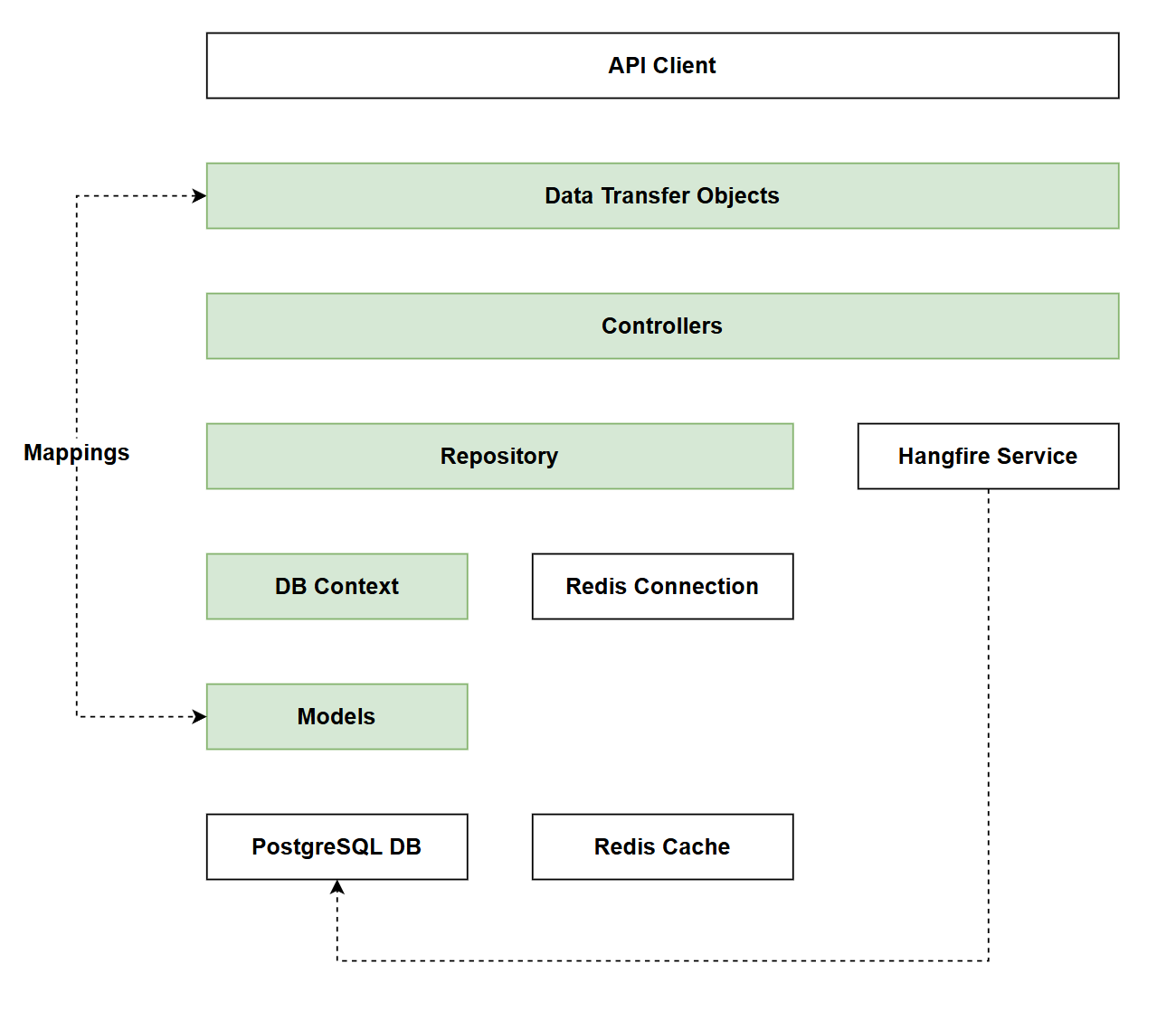
In reference to our solution architecture, we'll be making code changes to the highlighted components in this chapter:
- Controllers (complete)
- DTOs (complete)
- Repository (complete)
- DB Context (complete)
- Models (complete)
Indeed by the end of this chapter we'll have fully implemented all of our solution architecture!
- The code for this section can be found here on GitHub
- The complete finished code can be found here on GitHub
Feature branch
Ensure that main is current, then create a feature branch called: chapter_27_docs, and check it out:
git branch chapter_27_docs
git checkout chapter_27_docs
If you can't remember the full workflow, refer back to Chapter 5
API Documentation
API documentation is essential for any web API as it serves as the contract between your API and its consumers. It describes what endpoints are available, what parameters they accept, what data they return, and how to authenticate. Without proper documentation, developers waste time guessing how to use your API, leading to frustration and incorrect implementations.
Traditionally, API specification documentation was written and maintained manually, a tedious and error-prone process. Documentation would quickly become outdated as the code evolved, creating confusion and bugs. This is where auto-generated documentation becomes invaluable.
The Open API Specification
The OpenAPI Specification is an industry-standard format for describing RESTful APIs in a machine-readable way. It's a JSON or YAML document that describes:
- Available endpoints and HTTP methods
- Request parameters (path, query, header, body)
- Request and response data structures
- Authentication methods
- API metadata (version, contact info, license)
The beauty of OpenAPI is that it's language-agnostic and tool-friendly. Once you have an OpenAPI document, you can:
- Generate interactive documentation that lets developers test API calls directly in the browser
- Auto-generate client libraries in various programming languages
- Validate requests and responses against the specification
- Generate mock servers for testing
- Import into API testing tools like Postman or Insomnia
Open API Specification was previously called the Swagger Specification. You can read more about the history of the project here.
Basic implementation
When we scaffolded the API way back in Chapter 3 (seems like a long time ago now!), the following package was included in the .csproj file:
<PackageReference Include="Microsoft.AspNetCore.OpenApi" Version="10.0.0" />
This package allows for the auto-generation of JSON based docs using our code.
Looking in Program.cs we also had the following middleware added to our pipeline:
if (app.Environment.IsDevelopment())
{
    app.MapOpenApi();
    app.UseHangfireDashboard(); // This was added in Chapter 22
}
So in essence we have everything we need to generate an OpenAPI-compatible spec.
To test this out, create a file called openapi.http, place it in the Requests folder, and add the following code:
@baseUrl = https://localhost:<your_https_port>
@baseUrlHttp = http://localhost:<your_http_port>

### JSON Doc Schema
GET {{baseUrl}}/openapi/v1.json
Running this request should yield the following (note I have only provided a section of what is returned as the response is large):
HTTP/1.1 200 OK
Connection: close
Content-Type: application/json;charset=utf-8
Date: Thu, 05 Mar 2026 19:34:50 GMT
Server: Kestrel
Content-Encoding: gzip
Transfer-Encoding: chunked
Vary: Accept-Encoding

{
  "openapi": "3.1.1",
  "info": {
    "title": "CommandAPI | v1",
    "version": "1.0.0"
  },
  "servers": [
    {
      "url": "https://localhost:7276/"
    }
  ],
  "paths": {
    "/api/Commands": {
      "get": {
        "tags": [
          "Commands"
        ],
        "parameters": [
          {
            "name": "PageIndex",
            "in": "query",
            "schema": {
              "pattern": "^-?(?:0|[1-9]\\d*)$",
              "type": [
                "integer",
                "string"
              ],
              "format": "int32"
            }
          },
As mentioned in the intro, this schema can be supplied to a number of different apps and systems to drive other features.
Interactive docs
The Microsoft.AspNetCore.OpenApi package provides all the functionality required to generate the raw JSON OpenAPI spec. However, it is often useful when developing an API to see what type of interactive documentation will be produced from the raw spec, so that's what we'll tackle in this section.
When it comes to generating this type of documentation from a .NET project you have a number of libraries to choose from, including but not limited to:
We're going to use Scalar, but to be honest integrating with Swashbuckle is almost an identical process.
First up add the package reference:
dotnet add package Scalar.AspNetCore
Add the following using statement to Program.cs:
using Scalar.AspNetCore;
Then update the middleware:
// .
// .
// .
// Existing code

if (app.Environment.IsDevelopment())
{
    app.MapOpenApi();
    app.MapScalarApiReference();
    app.UseHangfireDashboard();
}

// Existing code
// .
// .
// .
This code:
- Adds Scalar UI middleware to the HTTP request pipeline (development environments only)
- It sources the OpenAPI spec from
/openapi/v1.jsonas a default
- It sources the OpenAPI spec from
We have limited both the generation of the OpenAPI spec, and the Scalar documents to the Development environment only. You can of course elect to expose these in Production if so desired.
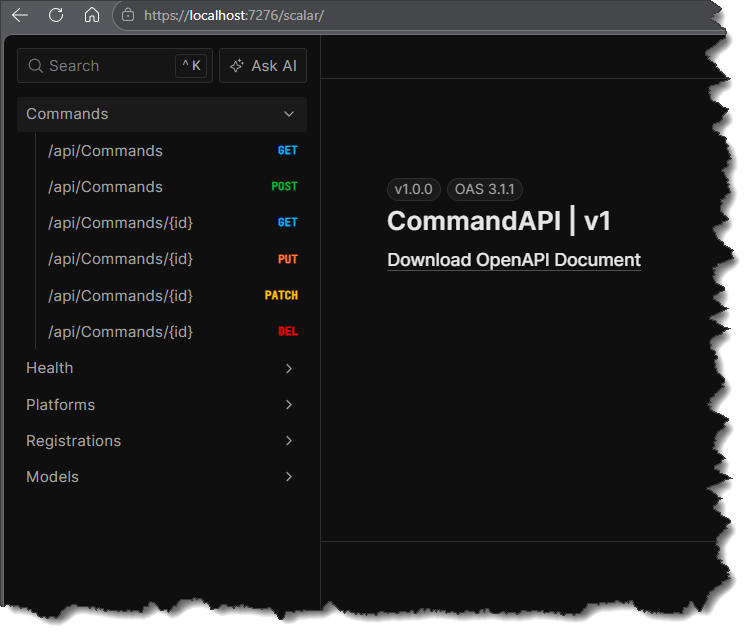
Navigate to: <yourhost>/scalar/ and you should see something similar to the following:
Exercising
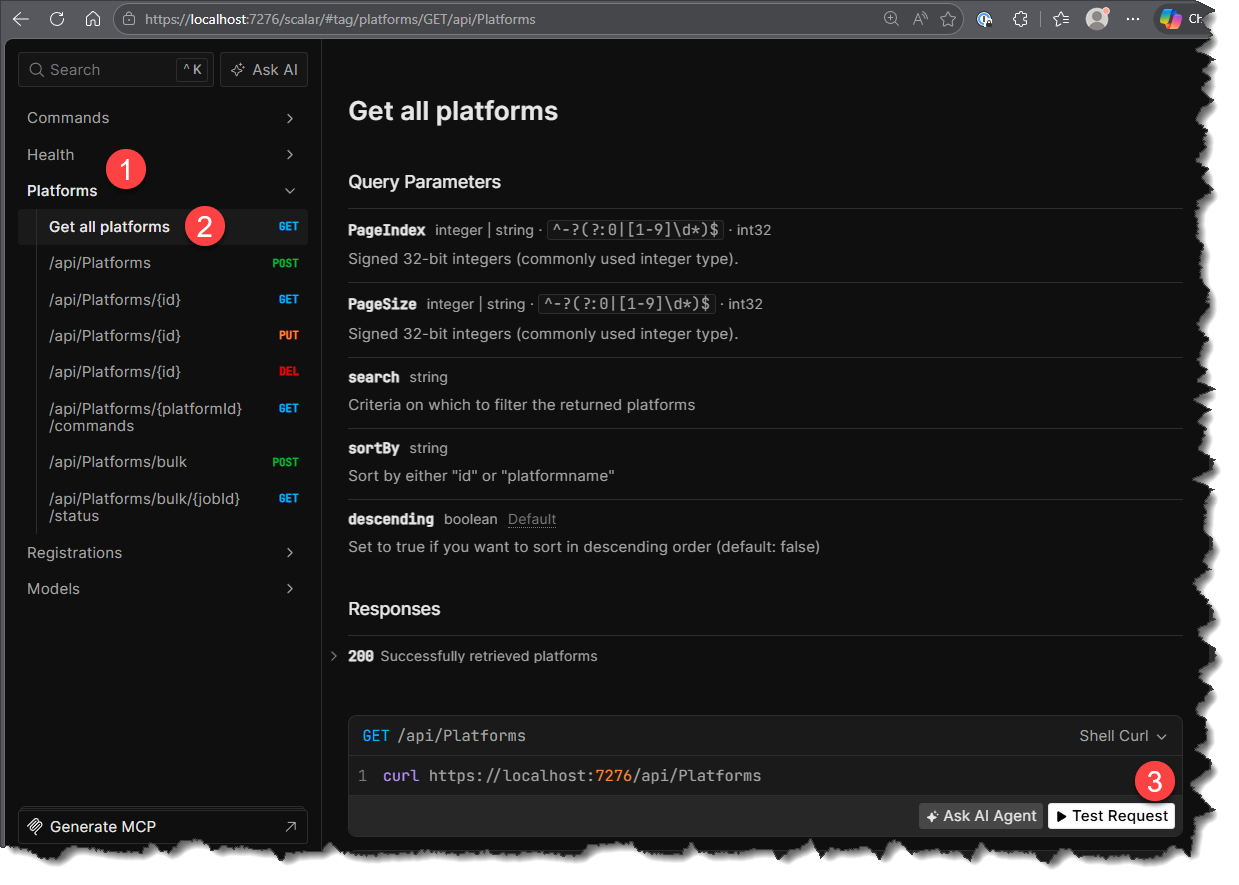
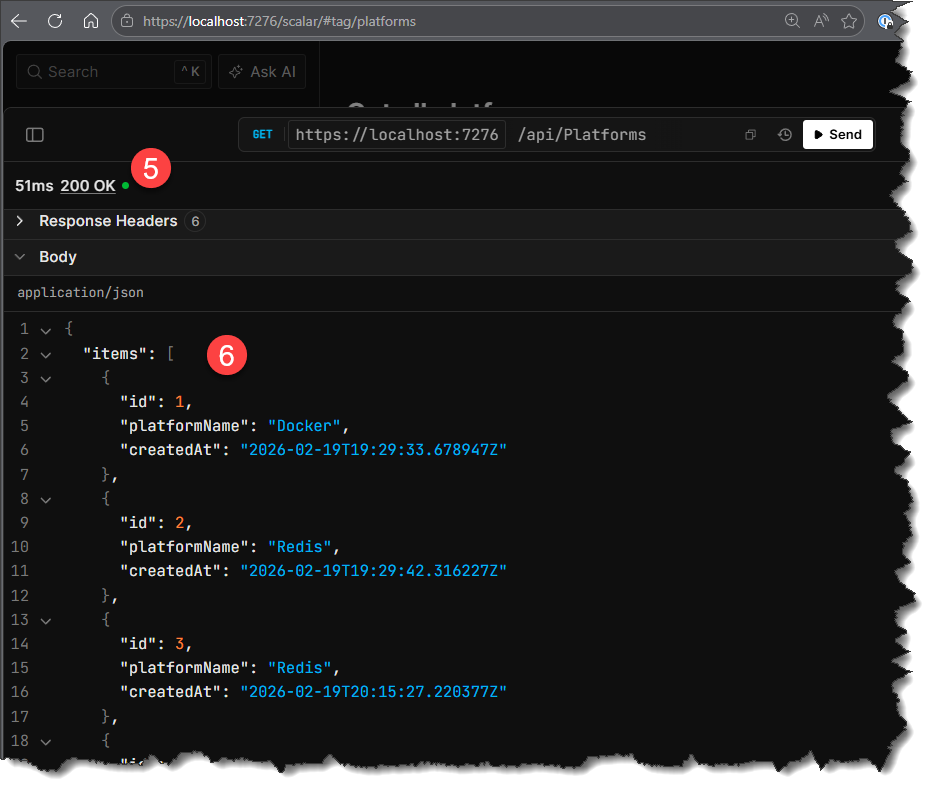
These are interactive docs because we can use them to exercise our endpoints. Let's go through a simple example.
- Select Platforms
- Select Get all platforms
- Select _Test request
- Select Send (you can elect to provide pagination, filtering and sorting here too):
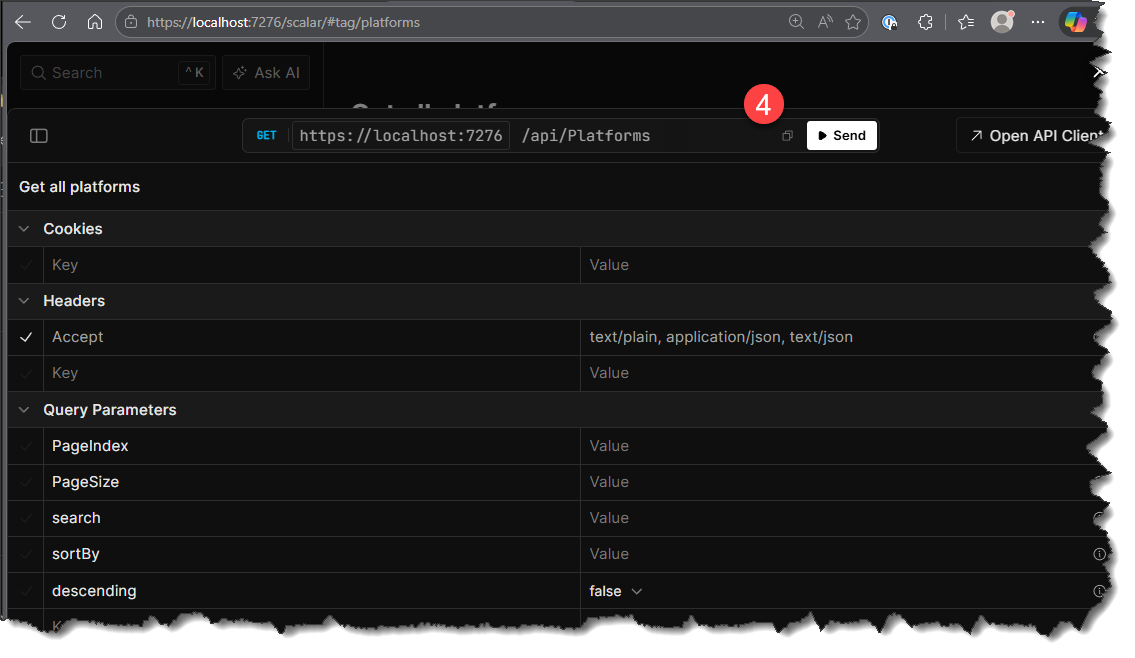
You should see:
- 200 OK response
- Response payload
XML Comments
The final thing we'll look at by way of documentation is adding XML comments to the code to explicitly document things like:
- Methods (including parameters)
- DTO properties
These comments are not only useful for developers reading the code (in most cases), but arguably more importantly, they can be woven into the OpenAPI spec and surfaced in solutions like Scalar, providing enhanced levels of documentation.
To illustrate their usefulness, let's look at the api/commands endpoint in Scalar, specifically the Query Parameters section:
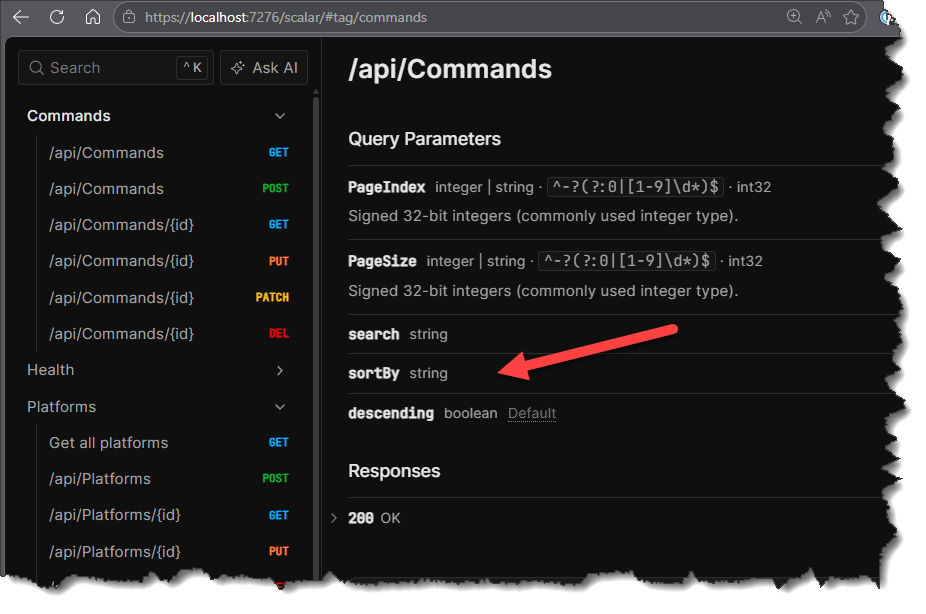
As a consumer of this API, what values can we supply for sortBy? It is not clear from the current version of the OpenAPI spec. This is where using XML comments in your code can provide this supplemental information.
Update .csproj
Before adding the comments to our code files, we need to make a couple of additions to the .csproj file to support XML based comments as shown below:
<Project Sdk="Microsoft.NET.Sdk.Web">

  <PropertyGroup>
    <TargetFramework>net10.0</TargetFramework>
    <Nullable>enable</Nullable>
    <ImplicitUsings>enable</ImplicitUsings>
    <UserSecretsId>some_user_Secret</UserSecretsId>
    <GenerateDocumentationFile>true</GenerateDocumentationFile>
    <!-- Suppress XML documentation warnings globally -->
    <NoWarn>$(NoWarn);1591</NoWarn>
  </PropertyGroup>
This code:
<GenerateDocumentationFile>true</GenerateDocumentationFile>- Instructs the compiler to generate an XML documentation file from XML comments in the code- This file (e.g.
CommandAPI.xml) would be stored in the build output directory (e.g.bin/Release/net10.0/CommandAPI.xml)
- This file (e.g.
<NoWarn>$(NoWarn);1591</NoWarn>- Suppresses compiler warning 1591 (missing XML documentation on public types/members)- This allows you to gradually add XML comments without getting warnings for undocumented code
The generated XML file is used by the OpenAPI generator to enrich the API documentation.
Endpoint parameter example
Open CommandsController.cs and place the highlighted XML comment above the GetCommands endpoint:
/// <summary>
/// Get all commands
/// </summary>
/// <param name="pagination">Pagination parameters (pageIndex and pageSize)</param>
/// <param name="search">Criteria on which to filter the returned commands</param>
/// <param name="sortBy">Sort by either: "id", "howto", "commandline", "createdat" or "platform". Only 1 can be supplied, "id" is defaulted to if none supplied.</param>
/// <param name="descending">Set to true if you want to sort in descending order (default: false)</param>
/// <returns>Paginated list of platforms</returns>
/// <response code="200">Successfully retrieved commands</response>
[HttpGet]
[ResponseCache(Duration = 300, Location = ResponseCacheLocation.Any, VaryByQueryKeys = new[] { "pageIndex", "pageSize", "search", "sortBy", "descending" })]
public async Task<ActionResult<PaginatedList<CommandReadDto>>> GetCommands(

// Existing code
// .
// .
// .
This code:
- Provides a
<summary>that describes the endpoint's purpose ("Get all commands") - Documents each parameter using
<param>tags with descriptions of what they accept - Specifies the return type and description using
<returns>(paginated list of platforms) - Documents HTTP response codes with
<response code>tags for API consumers
You will need to save the file, and:
- Stop and restart the API
- Reload Scalar for the changes to take effect.
Navigating back to the same Query Parameters for the api/commands endpoint, you should see:
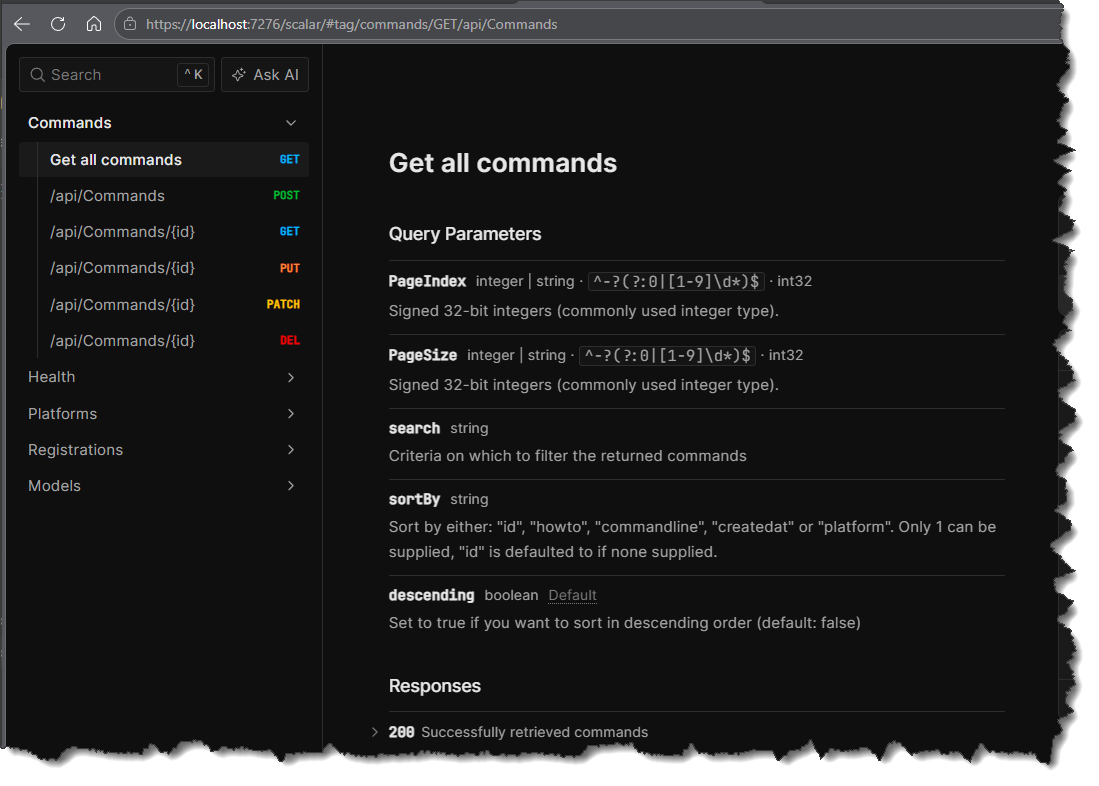
This is an altogether more pleasing experience than what we had before. Indeed if we don't provide documentation like this, potential consumers of your API will become quickly frustrated and reluctant to use the API. In cases where they have a choice of which platform (and API) to use - this could be critical to the success of your product.
DTO example
We can also provide this type of commentary on our DTOs, as shown below for the PlatformRead DTO:
namespace CommandAPI.Dtos;

/// <summary>
/// Data transfer object for reading platform data
/// </summary>
/// <param name="Id">The unique identifier of the platform</param>
/// <param name="PlatformName">The name of the platform</param>
/// <param name="CreatedAt">The created at timestamp for the platform</param>
public record PlatformReadDto(int Id, string PlatformName, DateTime CreatedAt);
This manifests in Scalar as follows:
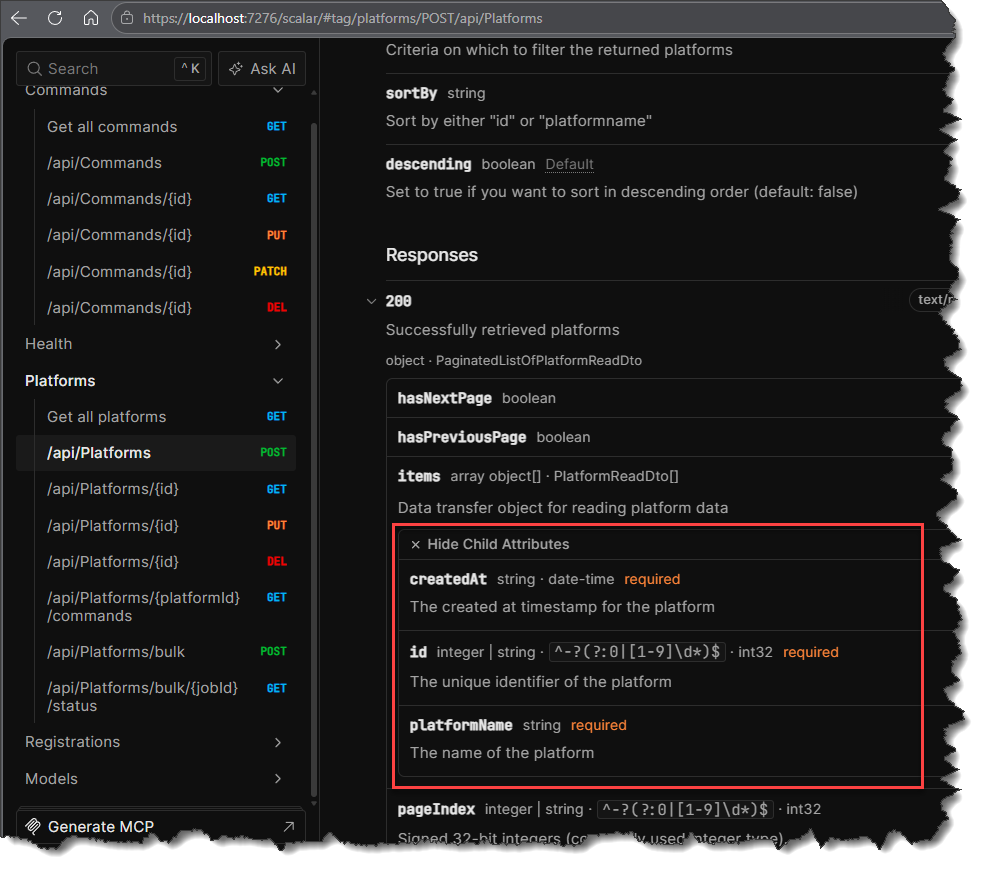
Now some may argue (reasonably perhaps) that in this case documentation is unnecessary as the property names of this DTO are self-explanatory. This may be true, however I still feel it is good practice to build this type of documentation into all your DTOs because:
- It provides a consistent approach to documentation, and embeds good practices from the start
- Some DTOs will have properties that are not self-explanatory - so documentation will be required. Why not just include it as a default practice.
Doc coverage
I'm not going to go through and document all DTOs, Endpoints etc. in this chapter as it would be way too long. This is one of those areas where I feel an AI agent can make a really useful contribution and automate a lot of this.
As with all things AI, you would need to validate that the documentation it generated for you was correct. The only thing worse than missing documentation, is incorrect documentation.
Version Control
With the code complete, it's time to commit our code. A summary of those steps can be found below, for a more detailed overview refer to Chapter 5
- Save all files
git add .git commit -m "add API docs"git push(will fail - copy suggestion)git push --set-upstream origin chapter_27_docs- Move to GitHub and complete the PR process through to merging
- Back at a command prompt:
git checkout main git pull
Conclusion
In this chapter we implemented an approach to API documentation for our API using the OpenAPI Specification. We started by leveraging the built-in Microsoft.AspNetCore.OpenApi package to generate a machine-readable JSON specification that describes all of our endpoints, parameters, and data structures.
We then took it a step further by integrating Scalar to provide interactive documentation that allows developers to explore and test our API directly from their browser. This type of documentation significantly improves the developer experience and reduces the friction in adopting and using your API.
Finally, we enhanced our documentation with XML comments, providing detailed descriptions for endpoints, parameters, DTOs, and response codes. The OpenAPI generator reads the compiled XML documentation file and weaves these descriptions directly into the OpenAPI specification. Scalar then displays this enriched specification, giving API consumers the clarity they need to use our API effectively.
In the next and final part of this book, we'll look at testing strategies to ensure our API remains reliable and maintainable as it continues to evolve.